Definition:
Experts in the field of networking debate whether two computers that are connected together using some form of communications medium constitute a network. Therefore, some works state that a network requires three connected computers. One such source, "Telecommunications: Glossary of Telecommunication Terms" states that a computer network is "A network of data processing nodes that are interconnected for the purpose of data communication". The term "network" being defined in the same document as "An interconnection of three or more communicating entities". A computer connected to a non-computing device (e.g., networked to a printer via an Ethernet link) may also represent a computer network, although this article does not address this configuration.
The same basic functions are generally present in this case as with larger numbers of connected computers. In order for a network to function, it must meet three basic requirements, it must provide connections, communications and services. Connections refers to the hardware, communications is the way in which the devices talk to each other, and services are the things which are shared with the rest of the network.
Classification of computer networks :
By network layer
Computer networks may be classified according to the network layer at which they operate according to some basic reference models that are considered to be standards in the industry such as the seven layer OSI' reference model and the four layer 'TCP/IP' model.
The Open Systems Interconnection Basic Reference Model (OSI Reference Model or OSI Model for short) is a layered, abstract description for communications and computer network protocol design, developed as part of Open Systems Interconnection (OSI) initiative. It is also called the
OSI seven layer model. The layers, described below, are, from top to bottom, Application, Presentation, Session, Transport, Network, Data Link and Physical.
Even though newer IETF and IEEE protocols, and indeed OSI protocol work subsequent to the publication of the original architectural standards have largely superseded it, the OSI model is an excellent place to begin the study of network architecture. Not understanding that the pure seven-layer model is more historic than current, many beginners make the mistake of trying to fit every protocol they study into one of the seven basic layers. This is not always easy to do as many of the protocols in use on the Internet today were desi3gned as part of the TCP/IP model, and may not fit cleanly into the OSI model
Transmission Control Protocol(TCP) and Internet Protocol(IP).
TCP -> As the name suggests it transfers the data from one system to the other IP - It takes the data in Packets form and delivers them to the specified destination through the IP address provided (to the specified node).
IP is essentially the data being sent with a nametag that is the destination.TCP makes sure the IP data arrives intact. If not it will resend the data.
1.IP - is responsible for moving packet of data from node to node. IP forwards each packet based on a four byte destination address (the IP number). The Internet authorities assign ranges of numbers to different organizations. The organizations assign groups of their numbers to departments. IP operates on gateway machines that move data from department to organization to region and then around the world.
2.TCP - is responsible for verifying the correct delivery of data from client to server. Data can be lost in the intermediate network. TCP adds support to detect errors or lost data and to trigger retransmission until the data is correctly and completely received.
By scale
Computer networks may be classified according to the scale or extent of reach of the network, for example as a Personal area network (PAN), Local area network (LAN), Campus area network (CAN), Metropolitan area network (MAN), or Wide area network (WAN)
By connection method
Computer networks may be classified according to the hardware technology that is used to connect the individual devices in the network such as Ethernet, Wireless LAN, HomePNA, or Power line communication.
By functional relationship
Computer networks may be classified according to the functional relationships which exist between the elements of the network, for example Peer-to-peer and Client-server (workgroup) architectures.
A peer-to-peer (or "P2P") computer network relies primarily on the computing power and bandwidth of the participants in the network rather than concentrating it in a relatively low number of servers. Peer-to-peer networks are typically used for connecting nodes via largely ad hoc connections. Such networks are useful for many purposes. Sharing content files containing audio, video, data or anything in digital format is very common, and realtime data, such as telephony traffic, is also passed using P2P technology.
A pure peer-to-peer network does not have the notion of clients or servers, but only equal peer nodes that simultaneously function as both "clients" and "servers" to the other nodes on the network. This model of network arrangement differs from the client-server model where communication is usually to and from a central server. A typical example for a non peer-to-peer file transfer is an FTP server where the client and server programs are quite distinct, and the clients initiate the download/uploads and the servers react to and satisfy these requests.
Classification of peer-to-peer networks
One possible classification of peer-to-peer networks is according to their degree of centralization:
Pure peer-to-peer:
Peers act as equals, merging the roles of clients and server
There is no central server managing the network
There is no central router
Hybrid peer-to-peer:
• Has a central server that keeps information on peers and responds to requests for that information.
• Peers are responsible for hosting available resources (as the central server does not have them), for letting the central server know what resources they want to share, and for making its shareable resources available to peers that request it.
• Route terminals are used addresses, which are referenced by a set of indices to obtain an absolute address.
Some examples of pure peer-to-peer application layer networks designed for file sharing are Gnutella and Freenet.
Meanwhile some may also categorize peer-to-peer networks into the following categories:
• Centralized P2P network such as Napster
• Decentralized P2P network such as KaZaA
• Structured P2P network such as CAN
• Unstructured P2P network such as Gnutella
• Hybrid P2P network (Centralized and Decentralized) such as JXTA, GreenTea and Shwup
Advantages of peer-to-peer networks
An important goal in peer-to-peer networks is that all clients provide resources, including bandwidth, storage space, and computing power. Thus, as nodes arrive and demand on the system increases, the total capacity of the system also increases. This is not true of a client-server architecture with a fixed set of servers, in which adding more clients could mean slower data transfer for all users.
The distributed nature of peer-to-peer networks also increases robustness in case of failures by replicating data over multiple peers, and -- in pure P2P systems -- by enabling peers to find the data without relying on a centralized index server. In the latter case, there is no single point of failure in the system.
When the term peer-to-peer was used to describe the Napster network, it implied that the peer protocol was important, but, in reality, the great achievement of Napster was the empowerment of the peers (i.e., the fringes of the network) in association with a central index, which made it fast and efficient to locate available content. The peer protocol was just a common way to achieve this.
While the original Napster network was a P2P network the newest version of Napster has no connection to P2P networking at all. The modern day version of Napster is a subscription based service which allows you to download music files legally.
Client-server is computing architecture which separates a client from a server, and is almost always implemented over a computer network. Each client or server connected to a network can also be referred to as a node. The most basic type of client-server architecture employs only two types of nodes: clients and servers. This type of architecture is sometimes referred to as two-tier. It allows devices to share files and resources.
Each instance of the client software can send data requests to one or more connected servers. In turn, the servers can accept these requests, process them, and return the requested information to the client. Although this concept can be applied for a variety of reasons to many different kinds of applications, the architecture remains fundamentally the same.
These days, clients are most often web browsers, although that has not always been the case. Servers typically include web servers, database servers and mail servers.
The interaction between client and server is often described using sequence diagrams. Sequence diagrams are standardized in the Unified Modeling Language.

Characteristics
Characteristics of a client
• Initiates requests
• Waits for and receives replies
• Usually connects to a small number of servers at one time
• Typically interacts directly with end-users using a graphical user interface
Characteristics of a server
• Passive (slave)
• Waits for requests from clients
• Upon receipt of requests, processes them and then serves replies
• Usually accepts connections from a large number of clients
• Typically does not interact directly with end-users
Multi-tiered architecture
Some designs are more sophisticated and consist of three different kinds of nodes: clients, application servers which process data for the clients, and database servers which store data for the application servers. This configuration is called a three-tier architecture, and is the most commonly used type of client-server architecture. Designs that contain more than two tiers are referred to as multi-tiered or n-tiered.
The advantages of n-tiered architectures is that they are far more scalable, since they balance and distribute the processing load among multiple, often redundant, specialized server nodes. This in turn improves overall system performance and reliability, since more of the processing load can be accommodated simultaneously.
The disadvantages of n-tiered architectures include:
1. More load on the network itself, due to a greater amount of network traffic.
2. More difficult to program and test than in two-tier architectures because more devices have to communicate in order to complete a client's request.
Comparison to Peer-to-Peer Architecture
Another type of network architecture is known as peer-to-peer, because each node or instance of the program can simultaneously act as both a client and a server, and because each has equivalent responsibilities and status. Peer-to-peer architectures are often abbreviated using the acronym P2P.
Both client-server and P2P architectures are in wide usage today..
Advantages
• In most cases, a client-server architecture enables the roles and responsibilities of a computing system to be distributed among several independent computers that are known to each other only through a network. This creates an additional advantage to this architecture: greater ease of maintenance. For example, it is possible to replace, repair, upgrade, or even relocate a server while its clients remain both unaware and unaffected by that change. This independence from change is also referred to as encapsulation.
• All the data are stored on the servers, which generally have far greater security controls than most clients. Servers can better control access and resources, to guarantee that only those clients with the appropriate permissions may access and change data.
• Since data storage is centralized, updates to those data are far easier to administer than would be possible under a P2P paradigm. Under a P2P architecture, data updates may need to be distributed and applied to each "peer" in the network, which is both time-consuming and error-prone, as there can be thousands or even millions of peers.
• Many mature client-server technologies are already available which were designed to ensure security, 'friendliness' of the user interface, and ease of use.
Disadvantages
• Traffic congestion on the network has been an issue since the inception of the client-server paradigm. As the number of simultaneous client requests to a given server increases, the server can become severely overloaded. Contrast that to a P2P network, where its bandwidth actually increases as more nodes are added, since the P2P network's overall bandwidth can be roughly computed as the sum of the bandwidths of every node in that network.
• The client-server paradigm lacks the robustness of a good P2P network. Under client-server, should a critical server fail, clients’ requests cannot be fulfilled. In P2P networks, resources are usually distributed among many nodes. Even if one or more nodes depart and abandon a downloading file, for example, the remaining nodes should still have the data needed to complete the download.
Examples
Imagine you are visiting an eCommerce web site. In this case, your computer and web browser would be considered the client, while the computers, databases, and applications that make up the online store would be considered the server. When your web browser requests specific information from the online store, the server finds all of the data in the database needed to satisfy the browser's request, assembles that data into a web page, and transmits that page back to your web browser for you to view.
Specific types of clients include web browsers, email clients, and online chat clients.
Specific types of servers include web servers, application servers, database servers, mail servers, file servers, print servers, and terminal servers. Most web services are also types of servers.
By network topology
Computer networks may be classified according to the network topology upon which the network is based, such as Bus network, Star network, Ring network, Mesh network, Star-bus network, Tree or Hierarchical topology network, etc.
Topology can be arranged in a Geometric Arrangement
Network Topologies are logical layouts of the network. The term "logical" used here marks a great significant. That means network topologies depends not on the "physical" layout of the network. No matter that computer on a network are placed in a linear format, but if they connected via a hub they are forming a Star topology, not the Bus Topology. And here is the important factor where networks differ, visually and operationally.
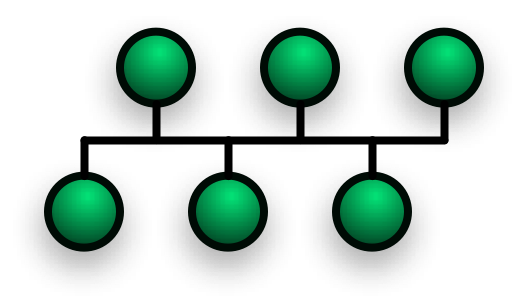
A bus network Topology is a network architecture in which a set of clients are connected via a shared communications line, called a bus. There are several common instances of the bus architecture, including one in the motherboard of most computers, and those in some versions of Ethernet networks.
Bus networks are the simplest way to connect multiple clients, but often have problems when two clients want to transmit at the same time on the same bus. Thus systems which use bus network architectures normally have some scheme of collision handling or collision avoidance for communication on the bus, quite often using Carrier Sense Multiple Access or the presence of a bus master which controls access to the shared bus resource.
A true bus network is passive – the computers on the bus simply listen for a signal; they are not responsible for moving the signal along. However, many active architectures can also be described as a "bus", as they provide the same logical functions as a passive bus; for example, switched Ethernet can still be regarded as a logical bus network, if not a physical one. Indeed, the hardware may be abstracted away completely in the case of a software bus.
With the dominance of switched Ethernet over passive Ethernet, passive bus networks are uncommon in wired networks. However, almost all current wireless networks can be viewed as examples of passive bus networks, with radio propagation serving as the shared passive medium.
Advantages and Disadvantages of a Bus Network
Advantages
• Easy to implement and extend
• Requires less cable length than a star topology
• Well suited for temporary or small networks not requiring high speeds(quick setup)
• Cheaper than other topologies
Disadvantages
• Difficult to administer/troubleshoot.
• Limited cable length and number of stations.
• If there is a problem with the cable, the entire network goes down.
• Maintenance costs may be higher in the long run.
• Performance degrades as additional computers are added or on heavy traffic.
• Proper termination is required.(loop must be in closed path).
• If many computers are attached, the amount of data flowing causes the network to slow down.
• Significant Capacitive Load (each bus transaction must be able to stretch to most distant link).
• It works best with limited number of nodes.
A ring network is a network topology in which each node connects to exactly two other nodes, forming a circular pathway for signals: a ring. Data travels from node to node, with each node handling every packet.
Because a ring topology provides only one pathway between any two nodes, ring networks may be disrupted by the failure of a single link. A node failure or cable break might isolate every node attached to the ring. FDDI networks overcome this vulnerability by sending data on a clockwise and a counterclockwise ring: in the event of a break data is wrapped back onto the complementary ring before it reaches the end of the cable, maintaining a path to every node along the resulting "C-Ring". 802.5 networks -- also known as IBM Token Ring networks -- avoid the weakness of a ring topology altogether: they actually use a star topology at the physical layer and a Multistation Access Unit to imitate a ring at the datalink layer.
Many ring networks add a "counter-rotating ring" to form a redundant topologies. Such "dual ring" networks include Spatial Reuse Protocol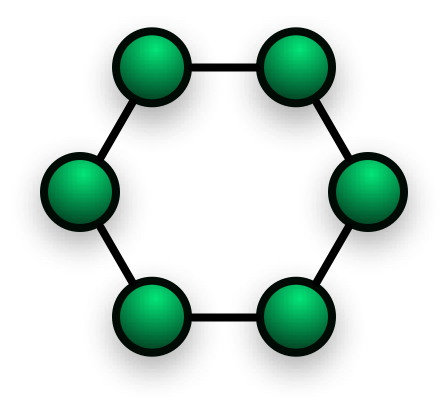
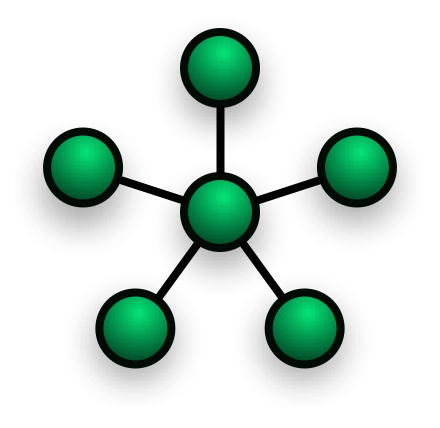
Star networks are one of the most common computer network topologies. In its simplest form, a star network consists of one central switch, hub or computer which acts as a conduit to transmit messages. If the central node is passive, the originating node must be able to tolerate the reception of an echo of its own transmission, delayed by the two-way transmission time (i.e. to and from the central node) plus any delay generated in the central node. An active star network has an active central node that usually has the means to prevent echo-related problems.
The star topology reduces the chance of network failure by connecting all of the systems to a central node. When applied to a bus-based network, this central hub rebroadcasts all transmissions received from any peripheral node to all peripheral nodes on the network, sometimes including the originating node. All peripheral nodes may thus communicate with all others by transmitting to, and receiving from, the central node only. The failure of a transmission line linking any peripheral node to the central node will result in the isolation of that peripheral node from all others, but the rest of the systems will be unaffected. Star networks are one of the most common computer network topologies. In its simplest form, a star network consists of one central switch, hub or computer which acts as a conduit to transmit messages. If the central node is passive, the originating node must be able to tolerate the reception of an echo of its own transmission, delayed by the two-way transmission time (i.e. to and from the central node) plus any delay generated in the central node. An active star network has an active central node that usually has the means to prevent echo-related problems.
The star topology reduces the chance of network failure by connecting all of the systems to a central node. When applied to a bus-based network, this central hub rebroadcasts all transmissions received from any peripheral node to all peripheral nodes on the network, sometimes including the originating node. All peripheral nodes may thus communicate with all others by transmitting to, and receiving from, the central node only. The failure of a transmission line linking any peripheral node to the central node will result in the isolation of that peripheral node from all others, but the rest of the systems will be unaffected.
Advantages
• Good performance.
• Scalable, Easy to set up and to expand.
• Any non-centralised failure will have very little effect on the network, whereas on a ring network it would all fail with one fault.
• Easy to detect faults
• Data Packets are sent quickly as they do not have to travel through any unnecessary nodes.
• It is used for centralised control.
Disadvantages
• Expensive to install
• Extra hardware required
• If the hub/switch fails the entire system is affected
By services provided
Computer networks may be classified according to the services which they provide, such as Storage area networks, Server farms, Process control networks, Value-added network, Wireless community network, etc.
By protocol
Computer networks may be classified according to the communications protocol that is being used on the network. See the articles on List of network protocol stacks and List of network protocols for more information.

 Posts
Posts

